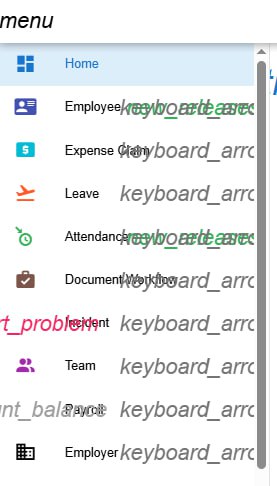
Dear Developer,
From my side, we keep experiencing this error message as in attachment, for both admin & employee users. May I know if there is any solution?
Dear Developer,
From my side, we keep experiencing this error message as in attachment, for both admin & employee users. May I know if there is any solution?
This is because your web browser could not download the required fonts completely.
Try clearing the browser cache and refresh again.
But it is happening to almost all user under my organization.. so is it because of we don’t clear the caches??
No, it’s because of your networking problem. The reason that I proposed you to try clearing the cache is to check if re-downloading will resolve this issue (if it’s due to slow connection)
Your networking environment somehow prevents the complete download of the required fonts. It may be due to slow connection, blocked connection etc.
You may want to ask your internal IT guy to check this issue instead.
I have tried to clear cache and check with my IT side and they said our connection is all fine. I am not sure of the reason since I’m still experiencing this issue as admin user and other employee users as well on web browser.. it works fine on mobile app anyway..
Try it at home, perhaps you will see the difference.
I will try on my own personal laptop.
So there is no solution from your side right?
This is not a problem from my end, therefore I am not able to offer any solution.
I can only give some suggestions for you to try to troubleshoot.